Older SAM Broadcaster Versions & SHOUTcast v2
This guide is for customers using an older version of SAM Broadcaster with a SHOUTcast v2 server, particularly when configuring Statistic Relays.
When digiSTREAM servers were upgraded to SHOUTcast v2, most encoder settings remained unchanged. However, SHOUTcast v2 introduced changes that affected some older SAM Broadcaster Statistic Relay configurations.
If your server was upgraded to SHOUTcast v2 and your Statistic Relay stopped working, use the instructions below for your version of SAM Broadcaster.
Statistic Relays
If you use SAM Broadcaster and use the Statistic Relays, you may need to make a small configuration change for a SHOUTcast v2 server.
Newer SAM Broadcaster Versions
- Go to the Statistics Relay window in SAM Broadcaster.
- Double-click the server entry you need to edit.
- In the edit window, locate SID and select 1.
- Click OK.
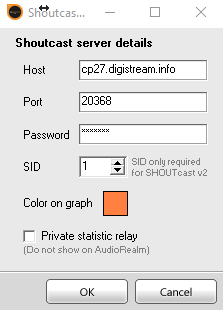
Your Statistic Relay should now work with the SHOUTcast v2 server.
Older Versions of SAM Broadcaster
If you are using an older version of SAM Broadcaster, such as v2, v3.x, or 4.2.2, the Statistic Relay window may not provide a SID field. In that case, add the SID to the port value.
- Go to the Statistics Relay window in SAM Broadcaster.
- Double-click the server entry you need to edit.
- In the Port field, add /stats?sid=1 after the port number.
- Click OK.
20368, the Statistic Relay
port value would be:
20368/stats?sid=1
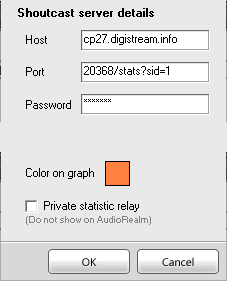
Your Statistic Relay should now work.
If the Statistic Relay still does not work after trying the appropriate method for your SAM version, you may need to remove the relay entry so that SAM does not repeatedly attempt to connect and create unnecessary lag or connection activity.
SHOUTcast Boards in Second Life
If you use a SHOUTcast board on your land or at a club, the board may also need to be updated for SHOUTcast v2.
If the board owner asks for a Mount Point, the original digiSTREAM instructions specify:
/stream
Some boards may request
stream without the leading slash.
Follow the instructions for the specific board.
If the board owner asks for an SID or Server ID, the original instructions specify:
1
If the board owner cannot get the board to work with SHOUTcast v2, they should contact the board creator. The board may require an update or a configuration change to support SHOUTcast v2.
The original digiSTREAM guide identified the following boards as known to work with SHOUTcast v2:
- SHX — Creator: Saii Hallard
- Daffy's Gadgetmania — Creator: Daffy Proto
- Lastat Productions — Creator: Lastat Daxter
- Clon's SHOUTcast Board — Creator: Clonatorul Watanabe
The original guide also referenced the SHX Note Card Wiz for creating cards for SRC-model boards. Because that is an external legacy resource, customers should verify that it is still available before relying on it.
Still Need Help?
If you are using an older version of SAM Broadcaster and cannot get Statistic Relays working with your SHOUTcast v2 server, first verify that you are using the correct method for your version of SAM.
If you still need assistance, contact digiSTREAM Support and include your server port and SAM Broadcaster version.
If the problem is specific to an older SAM Broadcaster release, the current version of the software may provide better SHOUTcast v2 compatibility.